

Last Updated: November 4, 2026
Quick Summary
To set up an ergonomic home desk for back pain, start with the chair: sit all the way back, set the seat so your feet rest flat and knees bend near a right angle, and support your lower-back curve. Then raise the screen to about eye level, keep the keyboard and mouse close with elbows near your sides, and change position every 30 to 45 minutes.
- Sit with your lower back against the backrest and feet flat on the floor.
- Leave about two fingers of space between the seat edge and the back of your knees.
- Place the top of your screen at or slightly below eye level, about an arm’s length away.
- Keep elbows near your sides at roughly 90 degrees and wrists straight while typing.
- Stand or walk every 30 to 45 minutes, since short frequent breaks beat one long break.
Table of Contents
- Why Your Home Workspace Can Trigger Back Pain
- How to Set Up Your Chair for Lower Back Support
- Ergonomic Desk Setup for Back Pain: Monitor, Keyboard, and Mouse
- How to Relieve Back Pain from Sitting at Desk Through Movement
- Setting Up a Low-Cost Workspace and Laptop Ergonomics
- When to See a Doctor for Chronic Back Pain
- Booking Your Back Pain Consultation in San Jose
- Frequently Asked Questions
Why Your Home Workspace Can Trigger Back Pain
Back pain from working at home is more common than most people think, and a poorly set up ergonomic home desk is often part of the cause. Readers who want to understand why prolonged sitting specifically causes back pain can find that covered in depth.
Long hours in one position put steady strain on the lower back. Your spine works best when it moves a little. When you sit still for hours, the muscles and discs in your lower back carry the load without relief.
Common home office problems include:
- A dining chair with no lumbar support
- A laptop screen that sits too low, so you hunch forward
- A desk that is too high or too low for your elbows
Pain from desk work often builds slowly over weeks.
How to Set Up Your Chair for Lower Back Support
Your chair is the foundation of a healthy ergonomic home desk. For more practical tips on supporting your lower back during daily activities, see the related guidance.
If your chair has lumbar support, set it so it fills the natural curve of your lower back.
Keep these points in mind:
- Seat depth: Leave about two fingers of space between the seat edge and the back of your knees.
- Armrests: Set them so your shoulders stay relaxed and your elbows rest lightly at your sides.
- Posture check: Your ears, shoulders, and hips should line up when you look at yourself from the side.
If you use a dining chair or sofa, you can still improve support with a cushion. Replace it with a supportive office chair when you can.
Ergonomic Desk Setup for Back Pain: Monitor, Keyboard, and Mouse
Your desk setup works as a system. When your screen, keyboard, and mouse are in the wrong place, your neck, shoulders, and back all compensate.
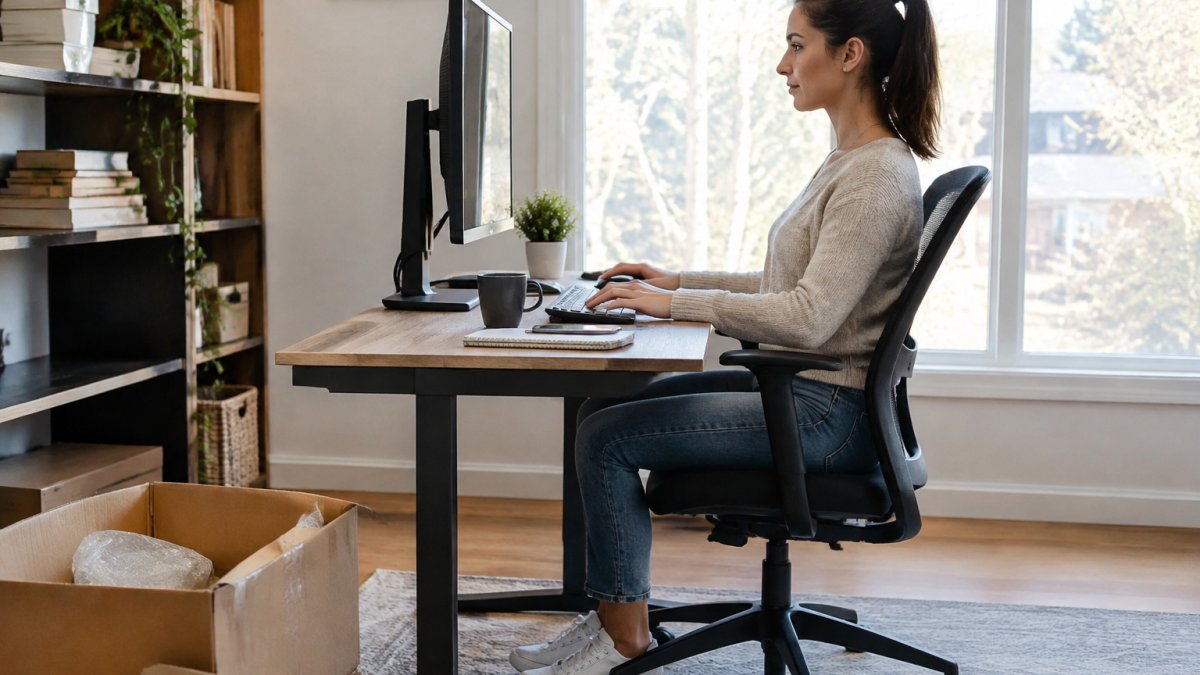
Positioning the Monitor at Eye Level
Place the top of your screen at or slightly below eye level. Sit about an arm’s length away. If you wear bifocals, you may need the screen even lower so you do not tilt your head back.
For laptop users, a simple stand or a stack of books under the laptop raises the screen. Then use a separate keyboard and mouse.
Keyboard, Mouse, and Neutral Wrist Position
Keep your keyboard close enough that your elbows stay near your sides and bend at roughly 90 degrees. Your wrists should stay straight, not bent up or down. Keep your mouse next to the keyboard so you do not reach out to the side all day.
Watch out: Reaching for a mouse placed far to the side can strain your shoulder and upper back, even if your chair is perfect.
How to Relieve Back Pain from Sitting at Desk Through Movement
Even a perfect setup will not protect you from sitting too long. Movement is the other half of the solution, and the reason is mechanical: prolonged sitting keeps your hip flexors shortened and your lower-back muscles under constant low-level load, while the discs in your lower spine lose some of the fluid movement that keeps them healthy. Brief, frequent position changes can help interrupt that cycle.
A Realistic Workday Movement Schedule
Short, frequent breaks are generally recommended over a single longer one. Use this as a template and shift the times to fit your calendar:
Book your consultation today! →
| Time | Action | Why it helps |
|---|---|---|
| Start of day | 2-minute standing back extension and shoulder rolls | Wakes up the muscles that support your spine before you sit |
| Every 30-45 minutes | Stand, walk to refill water, or take a short hallway loop | Breaks the static load on your lower back |
| Mid-morning | 3-minute walk, ideally outdoors | Combines movement with a posture reset |
| After lunch | 5-10 minute walk | Counters the post-meal slump that pulls you into a slouch |
| Mid-afternoon | 1 hour standing or perched on a high stool, if available | Alternates the load between sitting and standing |
| End of day | 2-minute knee-to-chest stretch and seated spinal twist | Releases the hip and back muscles that tightened while sitting |
Stretches That Target Desk-Related Back Pain
- Standing back extension: Stand with hands on your lower back, gently lean back a few inches, and hold for 5 seconds. Repeat 5 times. This counters the forward hunch most people hold at a screen.
- Seated spinal twist: Sit tall, cross one leg over the other, and rotate your torso toward the crossed leg. Hold 15-20 seconds per side.
- Knee-to-chest: Lie on your back, pull one knee toward your chest, and hold 20-30 seconds. Switch sides.
Watch out: Stretching should feel like gentle tension, not sharp pain. If a stretch sends pain down your leg or makes your symptoms worse, stop and note which movement triggered it so you can mention it to a provider.
Build Reminders That Actually Work
A timer is only useful if you act on it. Set a recurring phone or calendar reminder every 30-45 minutes, and pair it with a physical cue such as standing whenever you finish a task or take a call. If your work involves long video meetings, stand for the last five minutes of each call. The goal is not a perfect posture held all day; it is frequent changes so no single position becomes a strain.
Setting Up a Low-Cost Workspace and Laptop Ergonomics
You do not need expensive furniture to build a better workspace. Many people improve their setup with items they already own, but the fixes only work if they are matched to your body size and the pattern of your pain. A setup that helps one person can aggravate another.
Low-Cost Fixes by Problem
| Problem | Low-Cost Fix | Typical Benefit |
|---|---|---|
| Laptop too low | Stack of books or a sturdy box | Keeps your neck neutral |
| Chair lacks support | Rolled towel or cushion | Supports lower-back curve |
| Desk too high | Raise chair or use a footrest | Relaxes shoulders |
| Feet dangle | Small footrest or box | Keeps knees comfortable |
| Keyboard too high | Separate keyboard on a lower surface or lap desk | Keeps elbows near 90 degrees |
| Screen too close | Push the laptop back and enlarge text | Reduces eye strain and forward head posture |
Match the Setup to Your Body Size
General advice assumes an average frame, which is why it often fails. Adjust by proportion rather than by the numbers alone:
- Shorter users: A standard desk is often too high, so raise the chair and add a footrest so your feet stay supported. If your feet cannot reach the floor even with the chair raised, a footrest or a stack of books under your feet restores a stable base.
- Taller users: A standard desk may be too low, pushing your knees up and rounding your lower back. Raise the desk with bed risers or sturdy blocks, or switch to a standing setup for part of the day.
- Long torso or short arms: You may need the keyboard closer and the screen slightly higher than the standard eye-level rule suggests.
Adjust for Lower-Back Versus Upper-Back Symptoms
The same desk can produce different pain patterns, and the fix differs:
- Lower-back pain usually points to chair height, seat depth, and lack of lumbar support. Start with the chair and footrest before changing the screen.
- Upper-back and neck pain usually points to screen height and forward head posture. Raise the screen and bring the keyboard closer so you stop reaching and hunching.
- Shoulder or arm pain often traces to a mouse placed too far to the side or armrests set too high. Keep the mouse next to the keyboard and lower the armrests so your shoulders relax.
Laptop-Specific Ergonomics: The Trade-Off to Solve
A laptop forces a choice: put the screen at eye level and the keyboard becomes too high, or keep the keyboard comfortable and the screen sits too low. The fix is to separate the two.
Watch out: Working in bed or on the couch for long sessions is one of the most common causes of new back and neck pain, because soft surfaces give no support and force your spine into a rounded position. Maintaining a neutral posture throughout the entire day remains the most effective strategy to prevent back pain while you navigate the challenges of a remote workspace.
When to See a Doctor for Chronic Back Pain
Most back pain from desk work improves with better setup and movement. However, some signs mean you should get a professional evaluation.
See a doctor if you notice:
- Pain that lasts more than a few weeks despite changes
- Pain that spreads down one or both legs
- Numbness, tingling, or weakness in your legs or feet
Chronic pain is also worth discussing with a provider if it limits your daily activities. You can also review a deeper overview of proven non-surgical methods for chronic back pain. If your symptoms don’t improve, you can read about non-surgical treatment options for herniated disc pain.
Booking Your Back Pain Consultation in San Jose
If your back pain continues after you improve your home setup, professional guidance can help. Advanced Health Center offers non-surgical approaches to chronic back, neck, and joint pain.
You can learn more about our book a joint pain relief consultation page to see what to expect and schedule a visit. Pricing depends on your specific needs, so please visit the Advanced Health Center website or contact us for a current quote.
Frequently Asked Questions
What can I do to relieve back pain caused by working from home?
Start with your chair: adjust seat height so your feet rest flat and your knees sit at about hip level, and add lumbar support at the curve of your lower back. Raise your monitor so the top of the screen sits at or slightly below eye level, and keep your keyboard and mouse close enough that your elbows stay near your sides. Then break up long stretches of sitting. Standing, walking for a few minutes, or gentle stretches every 30 to 60 minutes reduce the load on your lower back. If pain persists for several weeks or worsens, schedule an evaluation rather than waiting for it to resolve on its own.
What is the 20-8-2 rule in ergonomics?
The 20-8-2 rule is a guideline for work posture and movement: after about 20 minutes of sitting, stand or change position for roughly 8 minutes, and do about 2 minutes of movement or stretching. It is a practical starting point rather than a clinical standard. Its value is in interrupting prolonged static sitting, which is one of the main contributors to desk-related lower back discomfort. Set a timer if you tend to lose track of time during focused work, and adjust the intervals to what your body tolerates.
How often should I stand up while working at a desk?
Most ergonomic guidance recommends standing or changing position at least every 30 to 60 minutes. Even a brief walk to refill water or a short standing call can reduce pressure on the lower spine. If you use a standing desk, alternate between sitting and standing rather than standing for hours without a break, since prolonged standing can also strain the back. Small, frequent changes work better than one long break, and they are easy to build into a normal workday.
When should I see a doctor for back pain from my home office?
See a doctor if back pain lasts more than a few weeks despite adjusting your setup, if it wakes you at night, or if it spreads down one or both legs. Seek care promptly for numbness, tingling, weakness in the legs, loss of bladder or bowel control, fever, or pain after an injury. An in-person evaluation can identify whether the problem is muscular, related to a disc, or something else that needs a different approach. Bring notes on when the pain starts, what makes it worse, and what changes you have already tried.
Keep your workspace simple, move often, and listen to your body. Small changes add up fast. If your pain persists, reach out to Advanced Health Center in San Jose to talk through your options.
