

Table of Contents
- Why Posture Matters When You Work From Home
- Set Up Your Home Office Ergonomic Setup for Better Posture
- Master the 90-90-90 Rule for Sitting Posture
- Posture Exercises for Desk Workers You Can Do Throughout Your Day
- How Often to Take Breaks From Sitting and Move Your Body
- Track Your Progress and Adjust as You Go
- When to Seek Professional Support for Chronic Pain
- Frequently Asked Questions
Last Updated: October 10, 2026
Why Posture Matters When You Work From Home
Poor posture while working from home leads to chronic pain and reduced mobility. Slouching stresses your spine, neck, and shoulders, with tension building gradually over weeks or months.
Without office structure, you may hunch over a laptop, sit on unsupportive furniture, or stretch to reach your keyboard, habits that compound into lasting problems.
We’ve worked with many office workers experiencing back and neck pain from poor workspace setups. The good news: you can improve posture working from home entirely within your control.
Better posture improves blood flow, reduces muscle fatigue, and helps maintain focus.
The best time to fix posture is before pain develops. If you’re already experiencing discomfort, addressing your workspace setup now can prevent the problem from worsening and may help reverse existing damage.
Set Up Your Home Office Ergonomic Setup for Better Posture
Your workspace setup determines whether you can maintain good posture throughout the day. The key is adapting ergonomic principles to your actual environment, whether you have a dedicated desk or not.
Adjust Your Chair and Desk Height
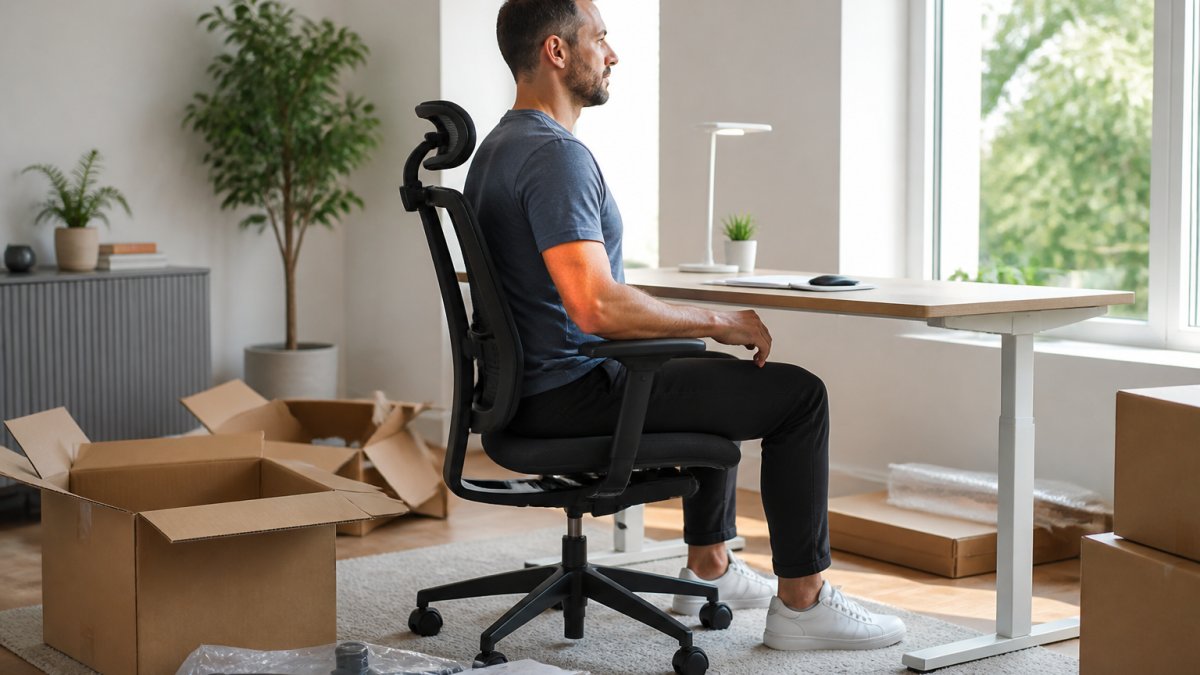
Your chair height is the foundation of proper posture. When seated, your feet should rest flat on the floor with knees bent at 90 degrees and thighs parallel to the ground. If your feet dangle, your chair is too high; if your knees point upward, it’s too low.
Your desk height matters equally. When your arms rest on the desk, your elbows should bend at 90 degrees with shoulders relaxed. Reaching down or up to type creates unnecessary strain.
Adapt Your Setup to Your Home Environment
Not everyone has a traditional desk. Here’s how to apply ergonomic principles to common home setups:
Kitchen or Dining Table Setup
If the table height is fixed, adjust your chair instead. Use a firm chair with a straight back. If the table is too high, use a footrest to maintain 90-degree knee and hip angles. If too low, place a cushion on your chair to raise seating height, then use a footrest to keep feet flat.
Sofa or Couch Setup
Sit upright at the edge rather than sinking into cushions. Place a firm pillow or rolled towel behind your lower back for lumbar support. Use a lap desk to hold your laptop at eye level, preventing downward neck strain.
Small Space or Laptop-Only Setup
Invest in an inexpensive laptop stand ($15-$40) and separate keyboard and mouse to prevent “tech neck” by raising your screen to eye level. This setup works in small apartments, dorm rooms, or shared spaces.
Low-Cost Household Alternatives
You don’t need expensive ergonomic equipment to improve posture:
- Lumbar support: Roll a towel and place it behind your lower back, or use a small pillow.
- Monitor stand: Stack books, a small box, or a wooden crate under your laptop to raise the screen.
- Footrest: Use a small box, step stool, yoga block, or even a stack of textbooks to support your feet.
- Keyboard tray: If your desk is too high, a small cutting board or wooden shelf can serve as a keyboard platform.
- Desk riser: Cinder blocks or wooden blocks under desk legs can raise the entire surface.
- Chair cushion: A firm cushion or folded towel on your seat raises your height without buying a new chair.
Position Your Screen at Eye Level
Your monitor position directly affects your neck and upper back. The top of your screen should be at or slightly below eye level when sitting upright. Place a laptop on a stand to prevent “tech neck.” Position the screen at arm’s reach, roughly 20 to 26 inches away.
Place Your Keyboard and Mouse Within Arm’s Reach
Your keyboard and mouse should sit close enough that you don’t stretch to reach them. Use a keyboard tray or adjust desk height so your keyboard sits at elbow height with wrists neutral. Place your mouse next to your keyboard at the same height to prevent shoulder and neck strain.
Master the 90-90-90 Rule for Sitting Posture
The 90-90-90 rule evaluates sitting posture: your hips, knees, and elbows should each bend at 90 degrees. This creates neutral spine alignment that’s sustainable for hours.
When all three angles are 90 degrees, your spine naturally assumes a neutral position. This is the posture that requires the least muscular effort to maintain throughout your workday.
Check this positioning several times daily, a quick self-check takes five seconds. Set phone reminders to help you remember to adjust your posture.
Posture Exercises for Desk Workers You Can Do Throughout Your Day
Static positioning creates fatigue over time. Posture exercises for desk workers should be simple enough to do at your desk. These exercises target your back extensors, shoulder stabilizers, and core muscles, making good posture feel easier. Consistent movement patterns integrated into your daily routine help alleviate desk fatigue by preventing the stiffness that often results from prolonged sedentary habits.
Neck and Shoulder Stretches
A simple neck stretch takes 30 seconds and provides immediate relief. Sit upright and slowly drop your right ear toward your right shoulder, holding for 15 to 20 seconds. Repeat on the other side.
Shoulder rolls release tension in your upper back. Slowly roll your shoulders backward 10 times, then forward 10 times.
A doorway chest stretch counteracts forward shoulder rounding. Stand in a doorway with your forearm against the frame at shoulder height, stepping forward until you feel a gentle stretch. Hold for 20 to 30 seconds on each side.
Book your consultation today! →
Spine and Lower Back Strengtheners
Weak lower back muscles contribute to slouching. Try seated spinal extension: sit upright, place your hands behind your head, and gently lean backward while engaging your core. Hold for two seconds and repeat 10 times.
Prone back extension strengthens your posterior chain. Lie face-down with hands under your shoulders, push your chest slightly off the ground, hold one second, and repeat 10 times.
Planks build core strength that stabilizes your spine. Hold a plank position for 20 to 30 seconds, keeping your body in a straight line. Repeat three times.
How Often to Take Breaks From Sitting and Move Your Body
Sitting for extended periods creates muscle fatigue and reduces circulation. Movement breaks interrupt this cycle and prevent pain. The frequency and structure of breaks matter more than their duration.
Staying seated for more than 90 minutes continuously increases your risk of developing musculoskeletal pain. Even perfect posture cannot prevent the negative effects of prolonged immobility. Your body is designed for movement, not static positioning.
Break Frequency and Duration
Take a movement break every 30 to 60 minutes of continuous sitting. Each break should last 2 to 5 minutes, long enough to change position and activate different muscle groups. If you work in 90-minute blocks, take a longer 10-minute break midway through.
A Simple Hourly Movement Routine
Follow a structured routine you can repeat every hour to address all muscle groups affected by sitting.
Every 30 minutes (2-3 minutes total):
- Stand and reach (30 seconds): Stand up, reach both arms overhead, and gently lean backward. Hold for 3 seconds. Repeat 5 times. This counteracts forward slouching.
- Neck rolls (30 seconds): Slowly roll your head in circles, 5 rolls forward, 5 rolls backward. Move deliberately, not quickly.
- Shoulder rolls (30 seconds): Roll your shoulders backward 10 times, then forward 10 times. Pause at the top of each roll.
- Walk in place (1 minute): Walk around your desk, to the kitchen, or down a hallway. Swing your arms naturally.
Every 60 minutes (5 minutes total):
Perform the 30-minute routine above, then add:
5. Doorway chest stretch (1 minute): Stand in a doorway with your forearm against the frame at shoulder height. Step forward until you feel a gentle stretch across your chest. Hold for 20 to 30 seconds on each side.
6. Seated spinal twist (1 minute): Sit upright in your chair. Cross your right leg over your left knee. Gently twist your torso to the right, using your left arm to deepen the stretch. Hold for 20 to 30 seconds on each side.
Every 90 minutes (10 minutes total):
Perform the 60-minute routine above, then add:
7. Bodyweight squats (1 minute): Stand with feet shoulder-width apart. Lower your body as if sitting into a chair, keeping your chest upright. Perform 10 to 15 repetitions. This activates your legs after prolonged sitting.
8. Glute bridges (1 minute): Lie on your back on the floor with knees bent and feet flat. Push through your heels to lift your hips toward the ceiling. Hold for 1 second at the top. Perform 15 repetitions. This strengthens your glutes and lower back.
9. Free movement (remaining time): Walk, stretch, or do light activity of your choice.
Set Reminders and Track Your Breaks
Set a timer or phone reminder for every 30 minutes, or tie breaks to your work rhythm by taking a break after finishing each email or task. This makes breaks feel like natural transitions.
Alternate Between Sitting and Standing
Alternate between sitting and standing throughout your day. If you have a standing desk, spend 20 to 30 minutes standing, then sit for 30 to 40 minutes. Otherwise, stand while taking phone calls or reading emails. During each break, move in ways that counteract sitting, stretch backward if hunched forward, or walk if your legs have been inactive.
Track Your Progress and Adjust as You Go
To improve posture working from home is a gradual process. Create a simple tracking system by noting your pain level and discomfort at the end of each workday. You may notice reduced neck tension and fewer headaches within a week.
Adjust your setup based on what you observe. If your lower back still hurts, you might need additional lumbar support. If your neck feels strained, your monitor might need to move slightly.
| Adjustment | Timeframe | Expected Result |
|---|---|---|
| Chair and desk height | Immediate | Reduced shoulder and neck strain |
| Monitor positioning | 2-3 days | Fewer headaches and neck tension |
| Movement breaks | 1 week | Increased energy and alertness |
| Posture exercises | 2-3 weeks | Stronger postural muscles and easier maintenance |
Take photos of your workspace setup to compare your positioning over time. Visual feedback motivates continued improvement.
When to Seek Professional Support for Chronic Pain
If you’ve implemented these changes and still experience persistent pain after two to three weeks, professional evaluation is warranted. Conditions like herniated discs, muscle strains, or nerve compression may require specialized treatment.
Advanced Health Center specializes in non-surgical, drug-free approaches to chronic pain relief using regenerative medicine and natural therapies.
Chronic pain from poor posture doesn’t have to be permanent. If your pain persists despite these changes, research on non-surgical pain management approaches shows that specialized treatment can provide lasting relief.
Frequently Asked Questions
How often should I take breaks from sitting while working from home?
Stand and move for at least 2-3 minutes every 30 minutes of sitting. This breaks up repetitive strain and prevents your muscles from tightening. Even a short walk around your home, some light stretching, or standing while on a call counts. Alternating between sitting and standing throughout your workday gives your spine and joints relief and improves circulation.
What is the 90-90-90 rule for sitting posture?
The 90-90-90 rule means your hips, knees, and elbows should all be at approximately 90-degree angles when sitting. Your feet should rest flat on the floor with thighs parallel to it, your elbows bent at 90 degrees with forearms level, and your back supported with your spine in a neutral position. This alignment reduces strain on your neck, shoulders, and lower back.
Can posture exercises and ergonomic changes fix years of poor posture?
Yes, consistent effort can improve posture significantly, though the timeline depends on how long poor posture has been present. Start with small adjustments to your workspace and add movement breaks and stretches daily. You may notice reduced discomfort. If chronic pain persists despite these changes, professional evaluation can identify underlying issues and guide targeted treatment.
What posture exercises can I do at my desk throughout the day?
Try neck rolls, shoulder shrugs, chest stretches against a doorframe, and seated spinal twists. Stand and do glute squeezes, calf raises, or gentle forward folds. Hold each stretch for 20-30 seconds and repeat 2-3 times. These desk-friendly exercises activate muscles that support your spine, reduce tension, and counteract the effects of prolonged sitting without requiring special equipment.